In a recent post, I described how to contribute a patch to an eclipse project using git as its version control system.
Patches are OK, but you lack all the social aspect that is enabled with git and its tooling (be it pure git + gerrit or github with the comments on commits and pull requests)
As of today, pull requests are not accepted by Eclipse committers since they lack IP (Intellectual Property) information, and the official git repositories at eclipse are hosted by the foundation not on github (github repositories of Eclipse projects exist for mirroring only).
Recently talking with a committer on the Eclipse Tycho project (Tobias Oberlies not to name him), he suggested to me to share my contributions via github, instead of attaching patches, as long as the git contribution scenario is followed
To comply with this suggestion,
Contents
- 0.1 1. I would clone the official repository at git.eclipse.org
- 0.2 2. work on my changes, test them, add them, and commit them for each functional change
- 0.3 3. create a new repository on my github account
- 0.4 4. synchronize my new github repo with the official tycho repository
- 0.5 5. push my committed changes to my github repository
- 0.6 6. add a comment to the bugzilla entry describing the fix or new feature I worked on, giving the github commit id
- 0.7 7. accept the IP conditions of the Eclipse foundation
- 1 To go deeper on that topic :
1. I would clone the official repository at git.eclipse.org
|
1 |
git clone http://git.eclipse.org/gitroot/tycho/org.eclipse.tycho.git |
2. work on my changes, test them, add them, and commit them for each functional change
|
1 |
git add myfile1 myfile2 |
|
1 |
git commit -m "BZ xxxxxx : comment" |
3. create a new repository on my github account
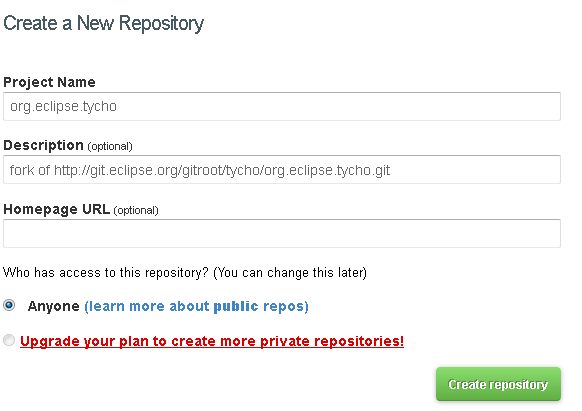
4. synchronize my new github repo with the official tycho repository
|
1 |
git remote add origin.github git@github.com:anthonydahanne/org.eclipse.tycho.git |
« behind proxy » users can use https access instead,
|
1 |
git remote add origin.github https://anthonydahanne@github.com/anthonydahanne/org.eclipse.tycho.git |
5. push my committed changes to my github repository
|
1 |
git push -u origin.github master |
6. add a comment to the bugzilla entry describing the fix or new feature I worked on, giving the github commit id
7. accept the IP conditions of the Eclipse foundation
That’s it ! you just contributed some code to a cool Eclipse project !
OK, it seems more complicated than just submitting a patch or a pull request, but once your local repo is set up,
you should have something like :
|
1 2 3 4 5 |
git remote -v origin http://git.eclipse.org/gitroot/tycho/org.eclipse.tycho.git (fetch) origin http://git.eclipse.org/gitroot/tycho/org.eclipse.tycho.git (push) origin.github https://anthonydahanne@github.com/anthonydahanne/org.eclipse.tycho.git (fetch) origin.github https://anthonydahanne@github.com/anthonydahanne/org.eclipse.tycho.git (push) |
and it is just a matter of juggling between the original repo, synchronizing the latest changes
|
1 |
git pull origin master |
and the github repo (pushing the latest changes)
|
1 |
git push origin.github master |
and copying/pasting the commit ids to the bugzilla entry.
I’m still relatively new to Git, so if you think there are better ways to sync the repositories, then please add a comment to this post !